

Music, video and games Music player and streaming app for Mac
AudioBench
by INTJ Software, LLC
- Price
- Paid (CA$199.99 in the Canadian App Store)
- Platforms
- Mac
- Requires
- macOS 15.6+
- Updated
- 14 Aug 2026




Overview
From the developer's App Store description:
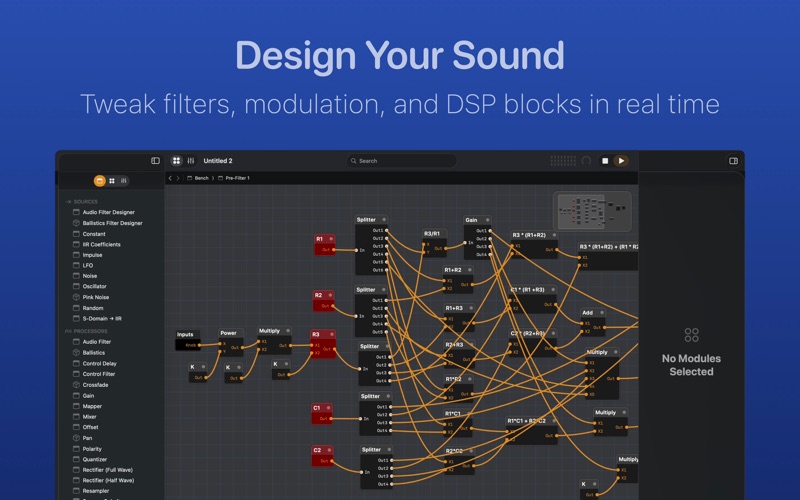
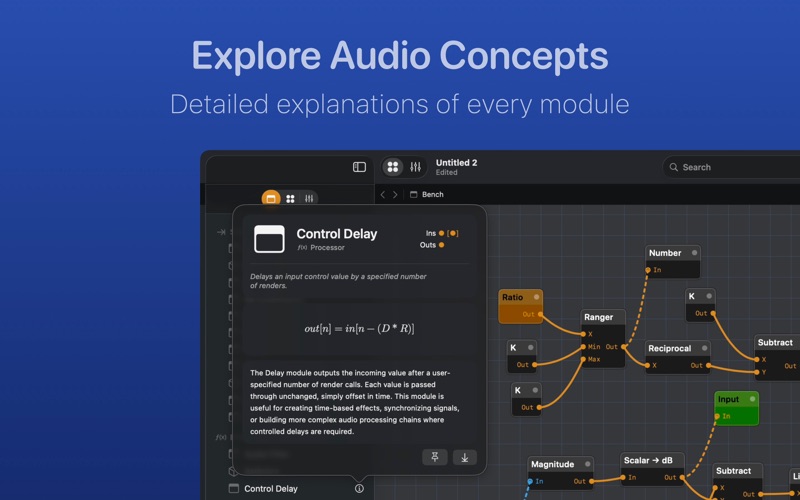
AudioBench is a modular audio laboratory app for assembling, controlling, and visualizing audio and control signal flows. It is ideal for prototyping, teaching, or exploring digital audio processing and synthesis concepts interactively, with a broad array of modules for real-time experimentation.
AudioBench is a music player and streaming app by INTJ Software, LLC for Mac. It needs macOS 15.6 or later.
Price and purchases
AudioBench is a paid app: CA$199.99 in the Canadian App Store. US pricing may differ.
Price from the App Store, checked 12 Nov 2026. Prices and purchases change; check the App Store before you buy.
Facts
- Price
- Paid (CA$199.99 in the Canadian App Store)
- Requires
- MacOS 15.6 or later
- Version
- 1.2.0
- Last updated
- 14 Aug 2026
- Size
- 15 MB
- Age rating
- 4+
- First released
- 4 Dec 2025
- App Store category
- Music
- Also listed in
- Education
From the App Store listing, checked .
What's new in version 1.2.0
New: Signal Probes Double-tap any port to watch the signal without rewiring. Audio probes show the waveform with peak and current dB. Control probes show minimum, maximum, and current. Bundle probes list every value. Readouts now scale themselves, so 4321 reads as 4.32k. New: Selection Focus Selecting a module dims everything not connected to it, keeping a busy Bench readable. Adjust it in Settings. Redrawn connections Cable, PCB, and ribbon connections now account for direction, bowing outward instead of cutting back through modules. Player Adds a jump trigger, jump position input, and position output, with a crossfade on jump. Also - Latch triggers on a transition from zero to non-zero. - Errors surface in a clear notification. - Search closes on Escape, an outside tap, or after adding a module. - Fixed module cards leaving a phantom hover region. - An optional local assistant service lets AI tools edit a Bench. Off by default.
From the developer's App Store release notes.
Alternatives to AudioBench
Other music player and streaming apps for Mac, by App Store chart ranking.


Details
- Developer
- INTJ Software, LLC ↗
- Category
- Music player and streaming
- Website
- intjsoftware.com