

Developer Coding and developer app for Mac
Incise
by Ivan Histand
- Price
- Free
- Platforms
- Mac
- Requires
- macOS 13.0+
- Updated
- 10 Nov 2026



Overview
From the developer's App Store description:
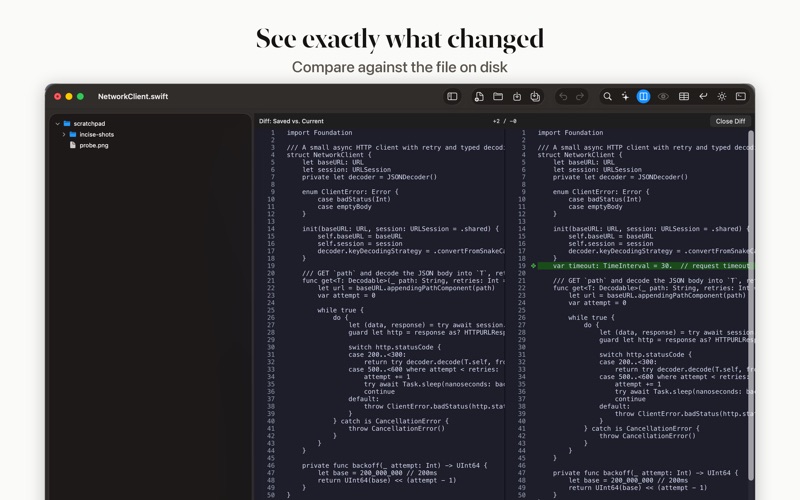
Incise is a fast, native text editor for developers — the spirit of Notepad++, rebuilt for macOS. 24-language syntax highlighting, multi-tab editing with drag-to-reorder tabs, regex find & replace, side-by-side diff, code folding, and one-command formatting for JSON, XML, and Markdown via Prettier.
Incise is a coding and developer app by Ivan Histand for Mac. It needs macOS 13.0 or later.
Price and purchases
Incise is free to download from the App Store.
Price from the App Store, checked 12 Nov 2026. Prices and purchases change; check the App Store before you buy.
Facts
- Price
- Free
- Requires
- MacOS 13.0 or later
- Version
- 1.16.1
- Last updated
- 10 Nov 2026
- Size
- 7 MB
- Age rating
- 4+
- First released
- 5 Jul 2026
- App Store category
- Developer Tools
- Also listed in
- Productivity
From the App Store listing, checked .
What's new in version 1.16.1
Easier-to-see find results, and a tab bar VoiceOver can use. • Find highlights every match: while the find bar is open, every match is highlighted in yellow, and the current one is solid yellow with dark text, so it stands out in light and dark themes. • With Regex on, Next now selects the whole text a pattern matched, not just as many characters as the pattern had. • VoiceOver reads the tab bar as a group of tabs, each with its name, whether it has unsaved changes and whether it is selected. Tabs can be selected, and closed from the Actions menu. • VoiceOver can reach and press Close Tab and New File, reads the find bar's close button as "Close Find Bar", and names the text area "Editor".
From the developer's App Store release notes.
Alternatives to Incise
Other coding and developer apps for Mac, by App Store chart ranking.


Details
- Developer
- Ivan Histand ↗
- Category
- Coding and developer
- Website
- incise.dev