

Productivity and work To-do list app for iPhone
Kan Do
by Stephen Robles
- Price
- Paid (€2.99 in a euro-area App Store)
- Platforms
- iPhone
- Requires
- iOS 26.0+
- Updated
- 11 Nov 2026



Overview
From the developer's App Store description:
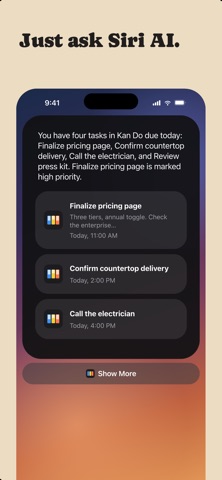
Organize your work into Spaces and Projects, then move tasks across the columns you define. Every card shows what matters at a glance: a cover image, subtitle, tags, priority, and due date. Open any task and you get a full markdown notes editor with headings, lists, checkboxes, images, and file attachments.
Kan Do is a to-do list app by Stephen Robles for iPhone. It needs iOS 26.0 or later.
Price and purchases
Kan Do is a paid app: €2.99 in a euro-area App Store. US pricing may differ.
Price from the App Store, checked 12 Nov 2026. Prices and purchases change; check the App Store before you buy.
Facts
- Price
- Paid (€2.99 in a euro-area App Store)
- Requires
- IOS 26.0 or later
- Version
- 1.7.2
- Last updated
- 11 Nov 2026
- Size
- 68 MB
- Age rating
- 4+
- First released
- 5 Aug 2026
- App Store category
- Productivity
- Also listed in
- Produktivität
From the App Store listing, checked .
What's new in version 1.7.2
Subtasks - Show Subtasks Under Tasks: a new switch in Settings > Appearance, off by default. Turn it on and each task lists its subtasks, indented, under its card on a board and under its row in a list. Check one off right there, and use the small arrow beside the progress pie to fold a task's list away - A dated subtask in Today, Upcoming, or a custom smart list now shows its parent task's subtitle and project, the same details the parent's own row shows Notes - Add up numbers: select a few lines with figures in them, such as a birthday budget, and the total appears at the bottom of the note. Tap the total to copy it. List numbering, dates, times, and phone numbers are left out - Notes written by an AI assistant through the MCP connector now show as formatted text (headings, bold, lists, checkboxes, links, code) instead of raw Markdown Comments - Newest first: tap the small arrow in the Comments header, or turn on Settings > Appearance > Newest Comments First, to put the latest comment at the top Sorting and search - Sort By Tag: every column, list heading, and smart list can sort by tag, A to Z or Z to A. Untagged tasks come last …
From the developer's App Store release notes.
Alternatives to Kan Do
Other to-do list apps for iPhone, by App Store chart ranking.



Details
- Developer
- Stephen Robles ↗
- Category
- To-do list
- Website
- kandotasks.app
