

Creative Audio and voice recording app for Mac
Ladiocast
by kawauso.com
- Price
- Free
- Platforms
- Mac
- Requires
- macOS 13.0+
- Updated
- 6 Nov 2026


Overview
From the developer's App Store description:
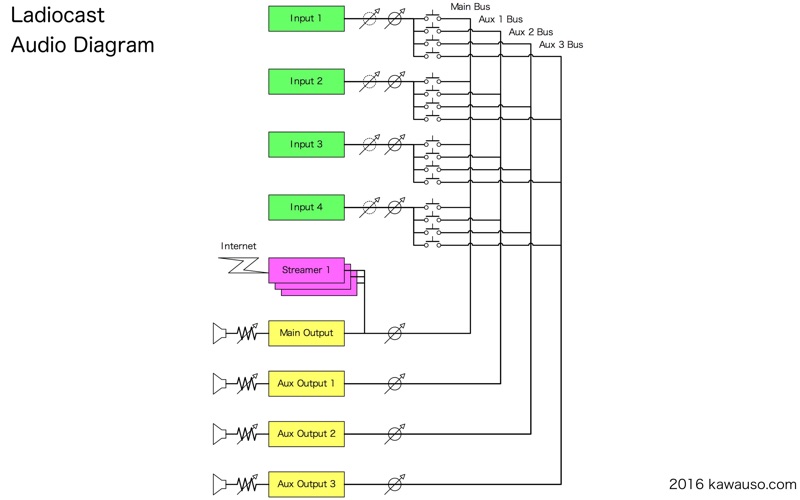
Ladiocast is a live audio mixer and broadcaster for your Mac. Plug in your microphone, music source and other audio devices, mix them, and stream the result to your own Internet radio server while you listen to it in your headphones. Ladiocast first appeared in 2007 and is free. Since version 1.1.0, Loopback Streamer passes your mix to recording and streaming apps on the same Mac.
Ladiocast is an audio and voice recording app by kawauso.com for Mac. It needs macOS 13.0 or later.
Price and purchases
Ladiocast is free to download from the App Store.
Price from the App Store, checked 12 Nov 2026. Prices and purchases change; check the App Store before you buy.
Facts
- Price
- Free
- Requires
- MacOS 13.0 or later
- Version
- 1.1.1
- Last updated
- 6 Nov 2026
- Size
- 4 MB
- Age rating
- 4+
- First released
- 29 Dec 2010
- App Store category
- Music
- Also listed in
- Utilities
From the App Store listing, checked .
What's new in version 1.1.1
This update adds no new features. It fixes problems in the streamers and the audio devices. • Icecast Streamer: Ogg Vorbis and Ogg Opus streams no longer stop reaching listeners after auto-reconnecting. • Icecast and SHOUTcast Streamers: the song title is now always sent in UTF-8, streaming goes on when updating the song title fails, and reconnecting stops right away when you disconnect. • RTMP Streamer: each AAC packet or MP3 frame is now sent in its own tag, timestamped from the amount of audio sent instead of the clock. • Ogg Opus: the quality level in VBR mode now takes effect. • AAC: settings the encoder does not support, such as a system sample rate above 48000 Hz, now show the reason instead of an internal error. • Input devices: the first 0.8 seconds are now discarded each time a device starts, so the noise from the audio jack of a Mac no longer comes through. Every input device is silent for those 0.8 seconds. • Also fixed: a buffer overrun when the buffer size of an input device becomes larger, device switches that were sometimes not applied, memory leaks when connecting again, and the Loopback device left behind when Ladiocast is ended by the kill command. …
From the developer's App Store release notes.
Alternatives to Ladiocast
Other audio and voice recording apps for Mac, by App Store chart ranking.
 Audio ConverterFree, same category, 34 MB larger
 SpeakerAmp:Booster & EqualizerFree, same category, 6.4 MB larger
 Boom3DFree, same category, 35 MB larger
 WavePad Audio EditorFree, same category, 104 MB larger
 Easy Audio Recorder LiteFree, same category, 21 MB larger
 To Audio Converter 2Free, same category, 16 MB larger
Details
- Developer
- kawauso.com ↗
- Category
- Audio and voice recording
- Website
- ladiocast-docs.kawauso.com