

Productivity and work PDF app for Mac
PDFify
by Dirk Holtwick
- Price
- Free
- Platforms
- Mac
- Requires
- macOS 10.14+
- Updated
- 18 Jul 2026


Overview
From the developer's App Store description:
Turn scans, images, emails & websites into searchable PDFs. Features 100+ languages OCR, PDF/A archiving, and Finder Quick Actions. Fast, secure, and intuitive! Stop searching, start finding.
PDFify is a PDF app by Dirk Holtwick for Mac. It needs macOS 10.14 or later.
Price and purchases
PDFify is free to download from the App Store.
Price from the App Store, checked 12 Nov 2026. Prices and purchases change; check the App Store before you buy.
Facts
- Price
- Free
- Requires
- MacOS 10.14 or later
- Version
- 5.2
- Last updated
- 18 Jul 2026
- Size
- 21 MB
- Age rating
- 4+
- First released
- 8 Sept 2018
- App Store category
- Productivity
- Also listed in
- Utilities
From the App Store listing, checked .
What's new in version 5.2
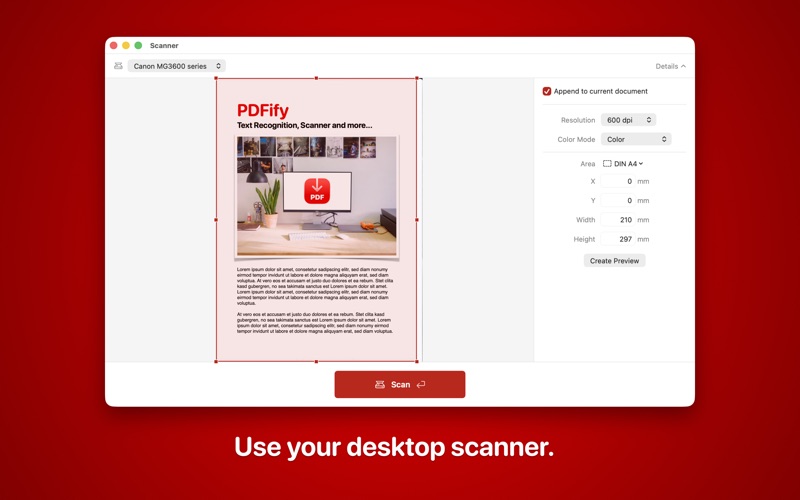
Completely redesigned scanner dialog (macOS 14 and later): Pick source, color mode, resolution, and duplex right in the window, run a preview, and drag to select the scan area. A compact view gets you scanning fast; a detailed view shows the preview and all settings side by side. Older systems keep the classic macOS scan interface. Choose where each scan goes with a single checkbox: Keep it off for a new document every time, or turn it on to append to the document you're working on. Set the scan area exactly: Drag in the preview, enter precise measurements in millimeters or inches, or pick a preset like DIN A4 or US Letter – remembered per scanner. Automate PDFify with App Shortcuts: Compress a PDF, make it searchable with OCR, convert it to PDF/A, get its text, or export text as JSON – straight from Spotlight, the Shortcuts app, or Siri, without opening the app. See PDF/A status at a glance: The status bar shows right away whether the open document is PDF/A (for example "PDF/A-1b"). Fit imported images into more page sizes: Now also A3, A5, US Legal, and Tabloid, in addition to A4 and US Letter.
From the developer's App Store release notes.
Alternatives to PDFify
Other PDF apps for Mac, by App Store chart ranking.
 PDFgearFree, same category, 109 MB larger
 PDF ReaderFree, same category, 2.6 MB larger
 Designs for Cricut MakerFree, same category, 8.0 MB smaller
 Design Space & Font for CricutFree, same category, 3.0 MB smaller
 Templates for AllFree, same category, 18 MB smaller
 PDF Reader for Adobe PDFFree, same category, 19 MB smaller
Details
- Developer
- Dirk Holtwick ↗
- Category
- Website
- pdfify.app

