

Creative Photo editing app for Mac
Photo Transfer via USB
by Viacheslav Koniukhov
- Price
- Free
- Platforms
- Mac
- Requires
- macOS 15.0+
- Updated
- 3 Nov 2026



Overview
From the developer's App Store description:
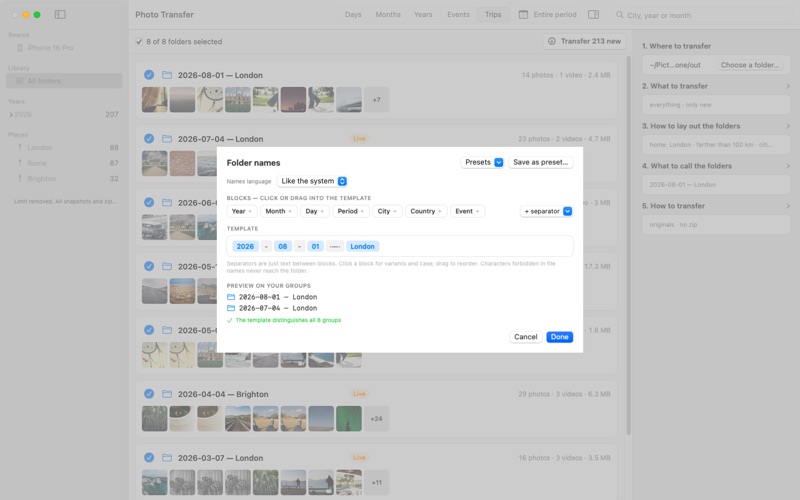
Transfer photos and videos from your iPhone or iPad to your Mac or an external drive, sorted into folders by date and trip, with every file verified. One cable, one click. Thousands of photos are easy to take and hard to find later. Photo Transfer turns them into folders you can browse in Finder: a day, a month, a week in Rome, each named with the date and the place.
Photo Transfer via USB is a photo editing app by Viacheslav Koniukhov for Mac. It needs macOS 15.0 or later.
Price and purchases
Photo Transfer via USB is free to download from the App Store.
Price from the App Store, checked 12 Nov 2026. Prices and purchases change; check the App Store before you buy.
Facts
- Price
- Free
- Requires
- MacOS 15.0 or later
- Version
- 1.2.0
- Last updated
- 3 Nov 2026
- Size
- 10 MB
- Age rating
- 4+
- First released
- 17 Sept 2026
- App Store category
- Photo & Video
- Also listed in
- Utilities
From the App Store listing, checked .
What's new in version 1.2.0
NEW: NO GROUPING A sixth layout, «No grouping»: every picture in one grid, newest first, with a tick on each, and the files land straight in the folder you chose, with no subfolders. Select the way you do in Photos: a click, ⌘-click, ⇧-click for a range, drag a box around tiles, ⌘A for everything; the circle of a selected picture ticks or unticks the whole selection. A double-click opens the picture. With zip on, the whole run is one archive. NEW: NEWEST OR OLDEST FIRST The arrows in the list's header turn any list over: the folders in the other layouts, the pictures in the grid. The same two choices are in the View menu. NEW: THE SIZE OF THE PICTURES A slider in the list's header, or ⌘+ and ⌘−, sizes the thumbnails: the previews in the folder cards and the tiles of the grid each keep their own size.
From the developer's App Store release notes.
Alternatives to Photo Transfer via USB
Other photo editing apps for Mac, by App Store chart ranking.


Details
- Developer
- Viacheslav Koniukhov ↗
- Category
- Photo editing, Printer and device
- Website
- phototransfer.app